One color stopped printing and the tank is full? Canon's Linux driver can't run a deep cleaning.
canon-ij-maint can, with one command and no Canon driver.
# deep clean the print heads
canon-ij-maint --queue Canon_G3010 clean --deep

# wait ~10 minutes, then check every color
canon-ij-maint --queue Canon_G3010 nozzle-check
What it does
Deep cleaning
The stronger cleaning cycle that Canon's Linux driver doesn't offer. Clears stubborn clogs.
Regular cleaning
The everyday print head cleaning, for faint lines or light streaks.
Nozzle check
Prints Canon's test pattern so you can see which color has gaps.
No driver needed
One small binary, no dependencies. Works through any CUPS queue or straight to /dev/usb/lp0.
Why it exists
Our Canon PIXMA G3010 stopped printing magenta. The tank was half full. Two regular cleanings from Linux changed nothing,
and the printer's buttons didn't start a deep cleaning. Canon's Linux driver only sends a regular cleaning, so we looked at
how it builds its commands. It's a small XML message with the cleaning type hard-coded to regular.
Setting it to deep worked: one deep cleaning and a 10-minute rest brought magenta back.
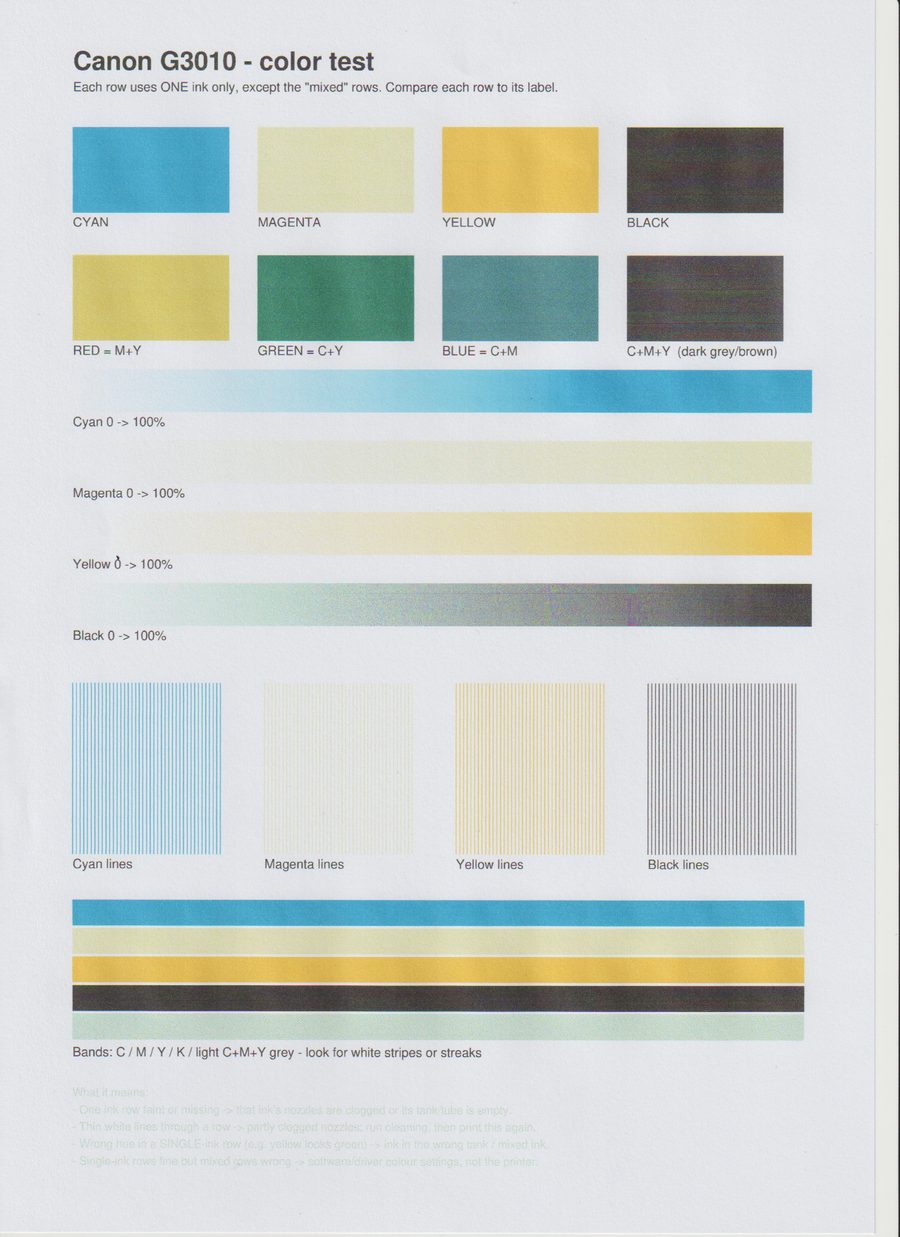
Before
Magenta prints as almost bare paper, so red comes out yellow and blue comes out teal.
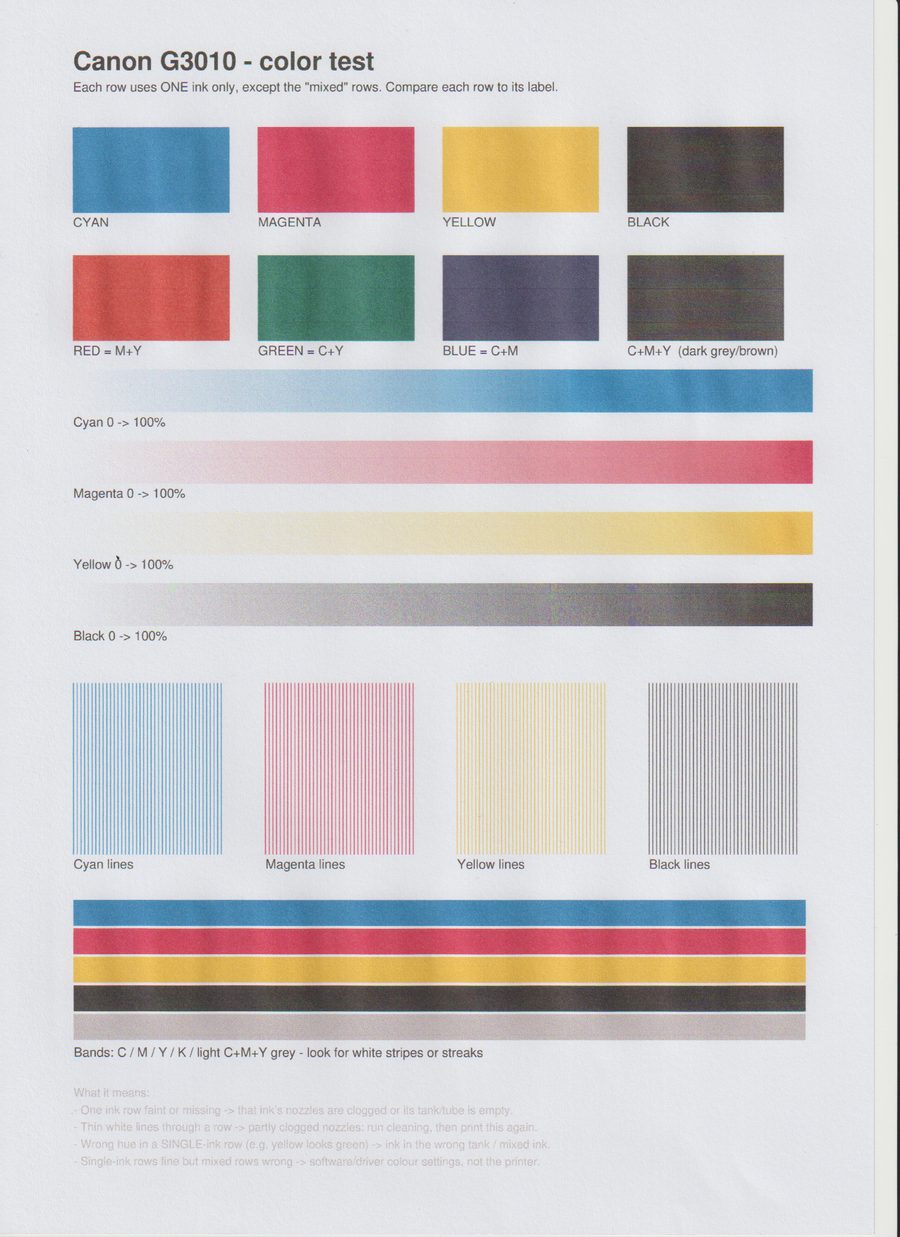
After one deep clean
Same test page, same scanner. Magenta, red and blue are back, and the greys are neutral.
Unedited flatbed scans (150 dpi) from the G3010's own scanner. Tap a scan to see it full size.
Install
Download the single binary. It has no dependencies (use arm64 instead of amd64 on a Raspberry Pi 4 or 5):
go install github.com/taktekhq/canon-ij-maint/cmd/canon-ij-maint@latest
How to deep clean a Canon PIXMA printer on Linux
1. Find your printer
canon-ij-maint list
This lists Canon printer queues in CUPS and any USB printer devices. If you have no queue yet, add the printer in your
system's printer settings (any driver is fine), or use --device /dev/usb/lp0.
2. Start the deep cleaning
canon-ij-maint --queue YOUR_QUEUE clean --deep
The printer should whir for 2–3 minutes. If it stays silent, it ignored the command.
3. Let it rest, then check
Wait about 10 minutes after it goes quiet so fresh ink soaks into the nozzles. Then print the pattern:
canon-ij-maint --queue YOUR_QUEUE nozzle-check
Still a gap in one color? Run one more deep cleaning. If two in a row don't help, the print head is probably worn out.
Supported printers
Printer
Regular clean
Deep clean
Nozzle check
PIXMA G3010 (USB)
Works
Works
Works
Other PIXMA, MegaTank G-series, TS, TR models using Canon's cnijfilter2 driver
Likely, untested
Likely, untested
Likely, untested
If your printer ignores a command, nothing happens and nothing breaks.
Tell us which model worked so we can add it.
FAQ
How do I deep clean a Canon PIXMA G3010 on Linux?
Canon's Linux driver only offers regular cleaning. Install canon-ij-maint and run
canon-ij-maint --queue YOUR_QUEUE clean --deep. Wait about 10 minutes after the printer stops, then print a nozzle check.
One color (e.g. magenta) isn't printing but the tank has ink. Why?
Usually that color's nozzles are clogged with dried ink, or there's air in its tube. Try a regular cleaning first, then a deep
cleaning followed by a 10-minute rest. On our G3010, two regular cleanings did nothing and one deep cleaning fixed it.
Does Canon's cnijfilter2 Linux driver support deep cleaning?
No. Its maintenance commands are limited to regular cleaning and a nozzle check. canon-ij-maint sends the same command format
with the cleaning type set to deep.
Do I need Canon's driver installed?
No. It is a single binary with no dependencies. It sends commands through any CUPS queue for the printer, including a Gutenprint one,
or writes straight to the USB printer device.
Can I deep clean just the color head?
The tool accepts --group color, but the G3010 ignores a color-only deep cleaning. Use the default (all).
Is deep cleaning bad for my printer?
It uses more ink than a regular cleaning and fills the waste-ink absorber faster. Use it when a regular cleaning hasn't helped,
and not more than twice in a row.
Paper ran out mid-print and nothing happens after I reload it.
On the G3010 you have to confirm after loading paper: press the printer's Black or Color button to resume.